


Nice Wallpaper 4K
0.00.00 Reviews
App Specs
- Version
- 22.0.0
- Updated On
- License
- Free
- Downloads
- 50,000+
- Developer
- TVH Studio
- Categories
- Libraries & Demo
- Platform
- Android
Screenshots
 Analysis by AppCompare
If you’re anything like me, you love spicing up your phone’s look every now and then. Enter Nice Wallpaper 4K, an app from TVH Studio in the Libraries & Demo category, built around changing the image shown when your device is locked. I see its appeal in that small, visible moment: a lock screen is something I glance at throughout the day, so a different image can make a familiar phone feel a little more personal without changing how I use it.
What the free access means
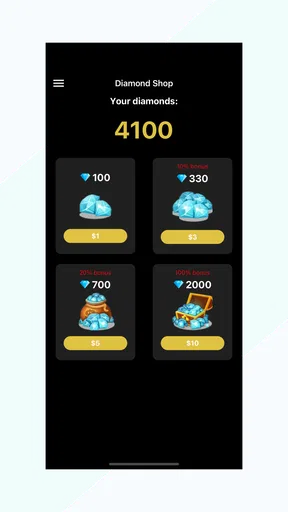
The app is free to install, with optional in-app purchases ranging from $0.49 to $17.99 per item. That makes it easy to try before deciding whether any paid option is worthwhile. I’d treat the free access as the starting point rather than assuming every image or function is included at no cost; check what a purchase applies to inside the app before spending. The advertised price range alone does not tell me which item offers the best value, so I wouldn’t buy anything until I knew it matched a specific need.
Where a changing lock screen earns its place
The central idea is practical rather than complicated: change the wallpaper associated with the locked screen. For someone who likes visual variety but doesn’t want to rebuild their home-screen layout, that distinction matters. A lock-screen image can be changed while keeping familiar icons and widgets in place, which is useful if you want a personal touch without disrupting the way you find your everyday apps.
A realistic use is to choose a calm, uncluttered image before a busy week, then switch to something brighter when you want a change. I’d favor pictures with a clear area where the clock and notifications sit, because a detailed image can compete with that information. That’s a small but useful selection habit: judge the wallpaper not only by how attractive it looks full-screen, but by whether it remains legible once the lock screen’s text is over it.
Deciding whether it fits your routine
This kind of app suits people who enjoy refreshing their phone’s appearance in small ways, especially if the lock screen is the part they see most often. It may also appeal to someone setting up a phone for a family member who wants a recognizable personal image without changing the rest of the interface. The content rating is Everyone, and the app is free to install, so trying it is a low-commitment way to see whether a dedicated wallpaper app fits your habits.
I would skip it if you rarely notice your lock screen, already have a wallpaper source you like, or prefer to keep a single background for a long time. Your phone’s built-in wallpaper controls may be enough if all you need is to select one image from your own gallery. A dedicated app makes more sense when you want to browse for alternatives; it is less compelling when you already know exactly which picture you want and simply need to set it once.
How it compares with built-in tools
Compared with the usual built-in wallpaper picker, a dedicated app can be a more convenient place to look for a change rather than relying only on images already saved on the device. The trade-off is another app to open and assess, plus the possibility of paid items to consider. Built-in controls are the simpler choice for a one-off change using a personal photo; Nice Wallpaper 4K is more relevant if browsing and changing the lock-screen look is something you expect to do repeatedly.
Worth Reading Before You Choose

Flipboard Shows What News Apps Must Do Beyond the Feed

Switching to Android Auto Means Rethinking Your Driving Routine

Google Calendar Makes a Crowded Week Easier to Manage

Ludo King Makes the Most of the Minutes Between Plans

Baby Panda World Brings Quick Play to Modern Phones, but Its Game Library Feels Busy

ESPN’s Live Game View Makes Following Close Games Easier
One useful workflow is to decide first whether you want a lock-screen image that feels quiet, colorful, or strongly themed, then browse with that purpose instead of scrolling without a plan. Before applying a choice, look at how the image’s brightest or busiest areas line up with the clock and alerts. This helps avoid a wallpaper that looks striking in a preview but makes the information you check most often harder to read.
A Splash of Color and Clarity
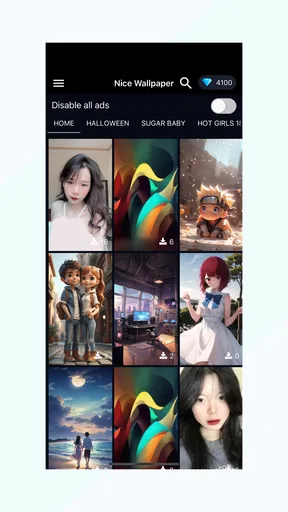
So, what’s the deal with Nice Wallpaper 4K? Well, it’s all in the name. This app offers a massive collection of stunning 4K wallpapers, and trust me, they are downright gorgeous. From breathtaking landscapes to minimalistic designs, there’s something for every taste. I found myself scrolling for ages, mesmerized by the vibrant colors and sharp details.
User-Friendly Interface
Now, let’s talk about usability. The interface is sleek and intuitive, which makes navigation a breeze. As soon as you open the app, you’re greeted with a clean and organized layout. Need to find a specific type of wallpaper? The categories and search function are your best friends. I was impressed by how quickly I could find exactly what I was looking for without any hassle.
A Personal Touch
One feature I absolutely love is the ability to personalize your wallpapers. You can crop, adjust, and even add some cool effects. It’s like having a mini photo editor right at your fingertips! This means you can tweak each wallpaper to perfectly suit your style or the mood you’re going for.
Even with editing tools, I’d keep the lock-screen job in mind: a crop that looks balanced as a standalone picture may place an important detail behind the clock once applied. I’d make small adjustments, check the result in the actual lock-screen view, and only then settle on it. That extra check is worthwhile for portraits, landscapes with a horizon, or any image where the subject sits near an edge.
Daily Updates
What’s awesome is that Nice Wallpaper 4K doesn’t just rest on its laurels. The app is updated daily with fresh designs, ensuring you’re never stuck with yesterday’s look. It’s like having a new wardrobe for your phone every day! I love waking up to see what new surprises await me each morning.
Performance and Accessibility
Let’s get into the nitty-gritty of performance. I’ve been using the app for a while now, and I’ve had zero issues with lag or crashes. It runs smoothly, which is a big plus for someone who’s constantly changing wallpapers like myself. Plus, it’s pretty light on the battery, so you don’t have to worry about it draining your phone’s juice.
For those concerned about accessibility, the app supports multiple languages, making it a great option for users around the globe. It’s clear the developers have thought about inclusivity, which is always a win in my book.
A Thought on Ads
Okay, so let’s address the elephant in the room – ads. Yes, there are ads, but they’re not particularly intrusive. They pop up occasionally but don’t disrupt the experience too much. And if you’re really not a fan, there’s an option to go ad-free with a premium version, which is reasonably priced.
For value, I’d separate the no-cost download from any optional spending. You can begin without paying, while individual in-app purchases are listed from $0.49 to $17.99. Whether a paid choice is worthwhile depends on what it unlocks and how often you use it; I wouldn’t call a purchase a bargain just because the starting price is low. If avoiding ads is your main goal, weigh that against how often they interrupt your own browsing rather than paying on assumption.
Details worth checking before installing
The app has 50K+ installs, an average rating of 0.0, and a current version of 22.0.0. It was released on Nov 19, 2023, and requires Android 6.0 or later. Those details help set expectations about reach and compatibility, but they don’t tell me whether it will suit every device or personal workflow. I’d make sure my phone meets the minimum operating-system requirement and then judge the experience by whether its wallpaper choices and controls are useful to me.
A common practical question is whether a dedicated wallpaper app is necessary at all. My answer is: only if browsing and changing images is part of the fun for you. If you have a photo you already love, the phone’s own gallery and wallpaper settings are likely the more direct route. If you want a stream of fresh options and enjoy tailoring images, this app’s purpose is easier to justify.
Final Thoughts
All in all, Nice Wallpaper 4K is a fantastic app for anyone looking to refresh their device’s appearance with minimal effort. With its vast selection, user-friendly design, and the ability to customize, it’s a must-try for wallpaper enthusiasts. Whether you’re into vibrant scenes or subtle patterns, this app has got you covered. So go ahead, give it a download, and let your phone’s personality shine!
My recommendation is a measured one: try it if you enjoy browsing for lock-screen images and want a straightforward way to make that part of your phone feel more personal. Keep the free starting point in mind, check the value of any optional purchase before paying, and use the built-in wallpaper controls instead if you only need to set one image. For someone who notices their lock screen and likes to change it, that is a sensible reason to give the app a look; for someone who doesn’t, there’s little need to add another tool to their phone.
Pros
- Stunning 4K resolution for vibrant detail.
- Wide variety of categories to choose from.
- Easy to navigate user interface.
- Regular updates with new wallpapers.
- Offline access to downloaded wallpapers.
Cons
- Some ads can be intrusive.
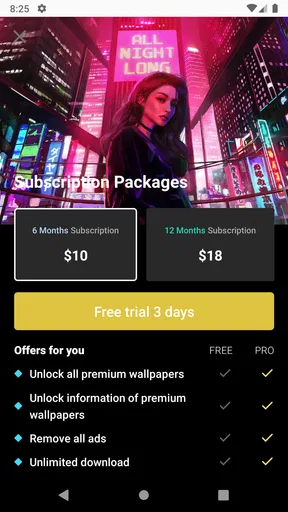
- Limited free content without subscription.
- Occasional app crashes reported.
- Requires internet for initial downloads.
- Battery drain on older devices.
FAQs for Nice Wallpaper 4K
What features does Nice Wallpaper 4K offer?
Nice Wallpaper 4K provides an extensive library of high-resolution wallpapers, including categories like nature, abstract, and technology. Users can personalize their home and lock screens with ease. The app also features daily updates and a favorites section to save preferred wallpapers for quick access.
Is Nice Wallpaper 4K free to use?
Nice Wallpaper 4K is free to download and use, with access to a wide range of wallpapers without any cost. However, it also offers in-app purchases for premium features, such as ad removal and exclusive content, which enhance the user experience.
Does the app require an internet connection?
An internet connection is required to browse and download wallpapers from Nice Wallpaper 4K's online library. Once downloaded, wallpapers can be set and accessed offline, allowing users to enjoy their selections without needing continuous internet access.
How does Nice Wallpaper 4K handle user privacy?
Nice Wallpaper 4K respects user privacy by not collecting unnecessary personal data. The app may request permissions for storage to save wallpapers, but it does not access or share personal information without explicit consent. Users can review the app's privacy policy for more details.
Is Nice Wallpaper 4K compatible with all devices?
Nice Wallpaper 4K is designed to be compatible with a wide range of Android and iOS devices. It supports various screen sizes and resolutions, ensuring that wallpapers fit perfectly. Users should ensure their device meets the minimum software requirements for optimal performance.


